Credit Notes
Overview
The Credit Notes module in the Centric System is designed to manage returns, adjustments, and refunds linked to customer invoices. Credit notes ensure accurate accounting by offsetting the amount from original invoices and maintaining clear financial records.
How to Access
To access Credit Notes:
- Log in to the Centric System dashboard.
- From the left sidebar, click on Sales.
- Select Credit Notes from the dropdown menu.
- The Credit Notes List View will appear, showing all issued credit notes.

Creating a New Credit Note
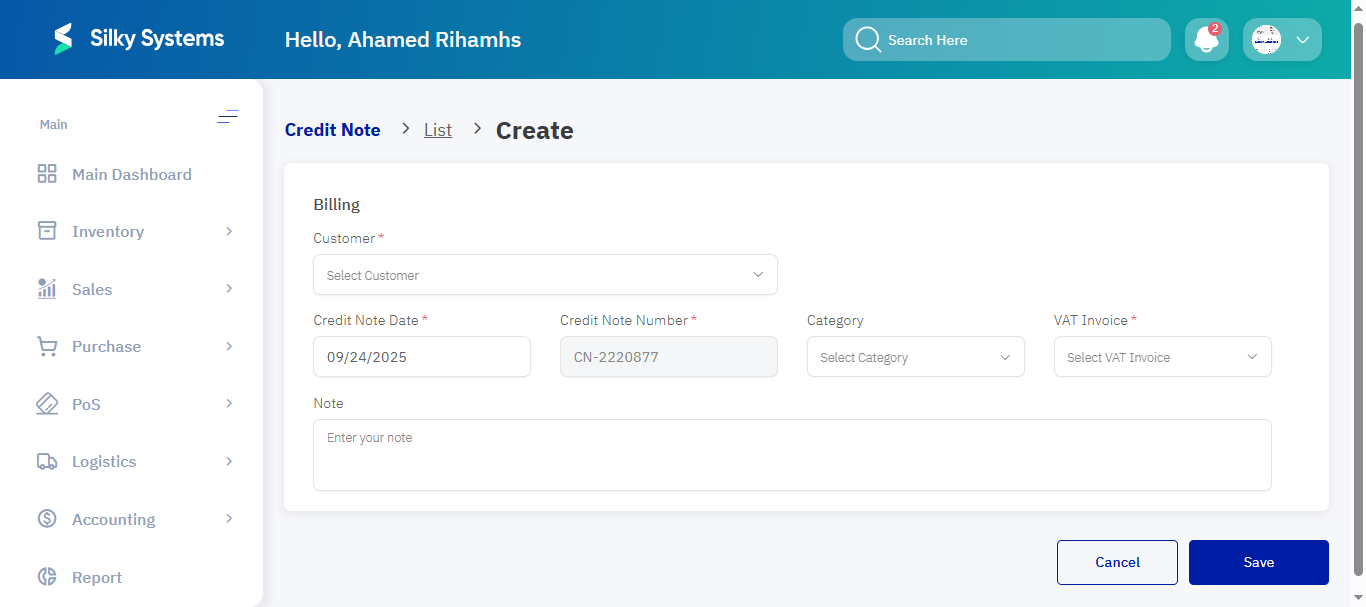
When creating a new credit note, fill in the following information:
- Customer Select the customer linked to the adjustment. Example: Ahmed Al-Ghamdi (CUST-1001)
- Credit Note Date Issuance date (auto-filled but editable). Example: 2024-03-15
- Credit Note Number System-generated unique ID. Example: CN-001-2024
- Tax Invoice Link the original invoice being adjusted. Example: INV-2024-500
- Credit Customer Account Toggle to deduct the amount directly from the customer’s balance.
Line Items Section
Click Add Item to specify:
- Description Reason for adjustment or product return. Example: Product Return – Damaged Goods
- Quantity Adjusted units. Example: 2 returned items
- Price Revised unit price. Example: SAR 50.00
- Discount Applicable discount percentage or value. Example: 10%
Post-Creation Management
On the main page, users can:
- Filter credit notes by status/date range.
- Export data to Excel or PDF.
- Duplicate records to create similar adjustments quickly.
Credit Note Actions
From the list view, quick actions are available:
- Print – Print the credit note for record-keeping.
- Download PDF – Export the credit note as a PDF file.

Access Rules
- Only users with Admin or Sales Manager roles can issue, edit, or delete credit notes.
- Credit notes cannot be deleted if already linked to processed transactions.
Benefits
- Accuracy: Ensures financial records reflect returns and adjustments correctly.
- Efficiency: Simplifies issuing refunds or correcting invoice errors.
- Integration: Directly links to customer accounts and invoices for full traceability.
- Transparency: Provides detailed reports on refunds and credit adjustments.