Products
Overview
The Products feature in the Centric System allows you to add and manage all products or services offered by your business. Each product can be defined with essential attributes such as name, type, prices, tax, images, SKU, barcode, and stock details. This feature ensures proper classification, tracking, and control of inventory across warehouses and categories.
How to Access
To access the Products section:
- Log in to the Centric System dashboard.
- From the left sidebar, click on Inventory.
- Select Products from the dropdown menu.
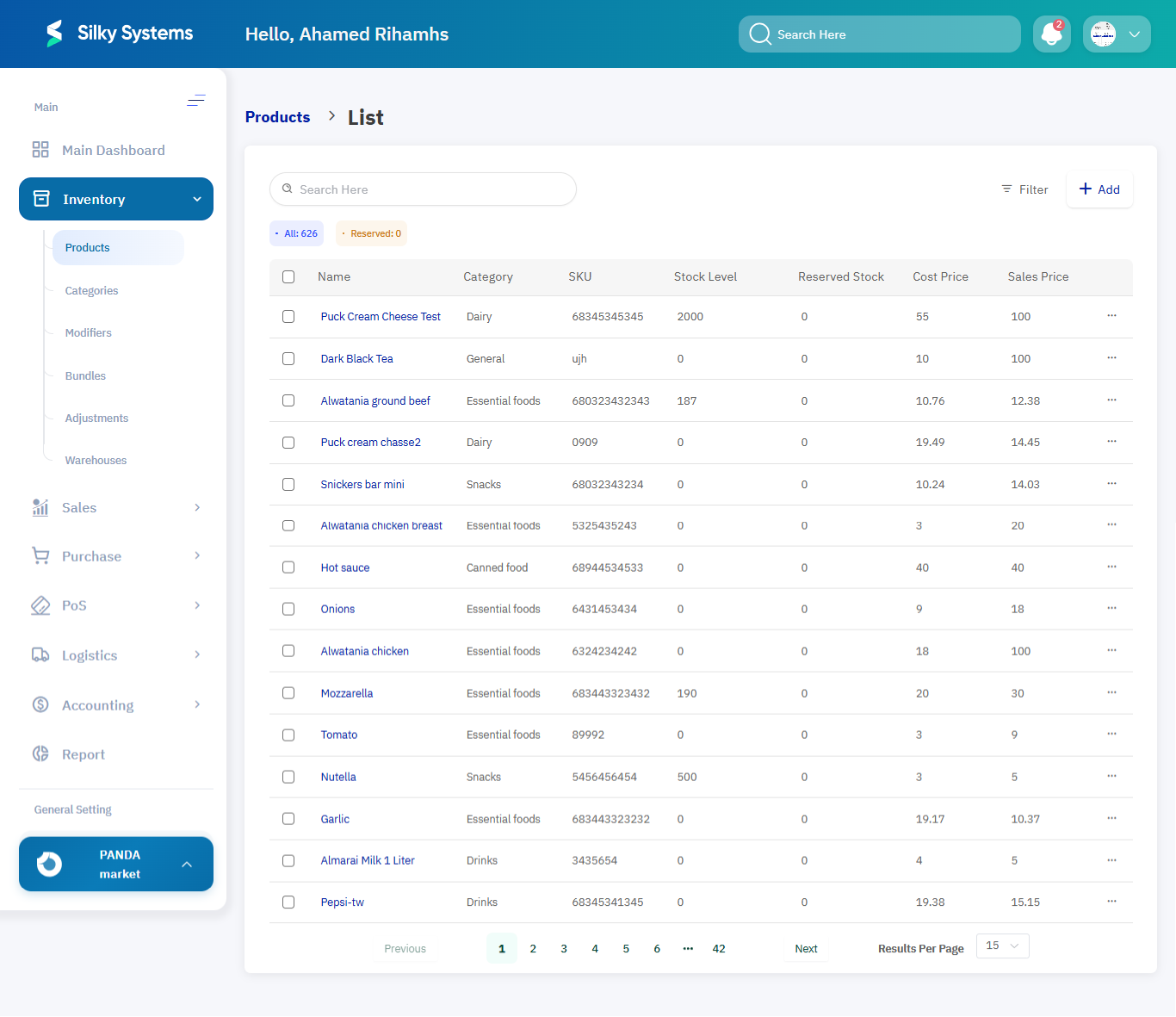
- The Product List View will appear, displaying all available products.
1. Product List View
The Product List page provides a complete overview of all products in the system. It includes:
- Name – Product name.
- Category – Linked category of the product.
- SKU – Stock Keeping Unit code.
- Stock Level – Current available quantity.
- Reserved Stock – Items reserved for pending orders.
- Cost Price – The purchase price from suppliers.
- Sales Price – The selling price to customers.
Users can filter products by Category, Warehouse, or Status, and search using keywords.
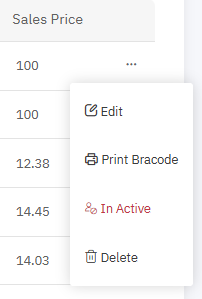
Product Actions: Each product listed provides quick action options:
- Edit – Modify product details.
- Delete – Remove the product (if not linked to active records).
- Print Barcode – Generate and print barcode labels for products.
2. Adding a New Product
To create a new product:
- Click on the + Add button on the Product List page.
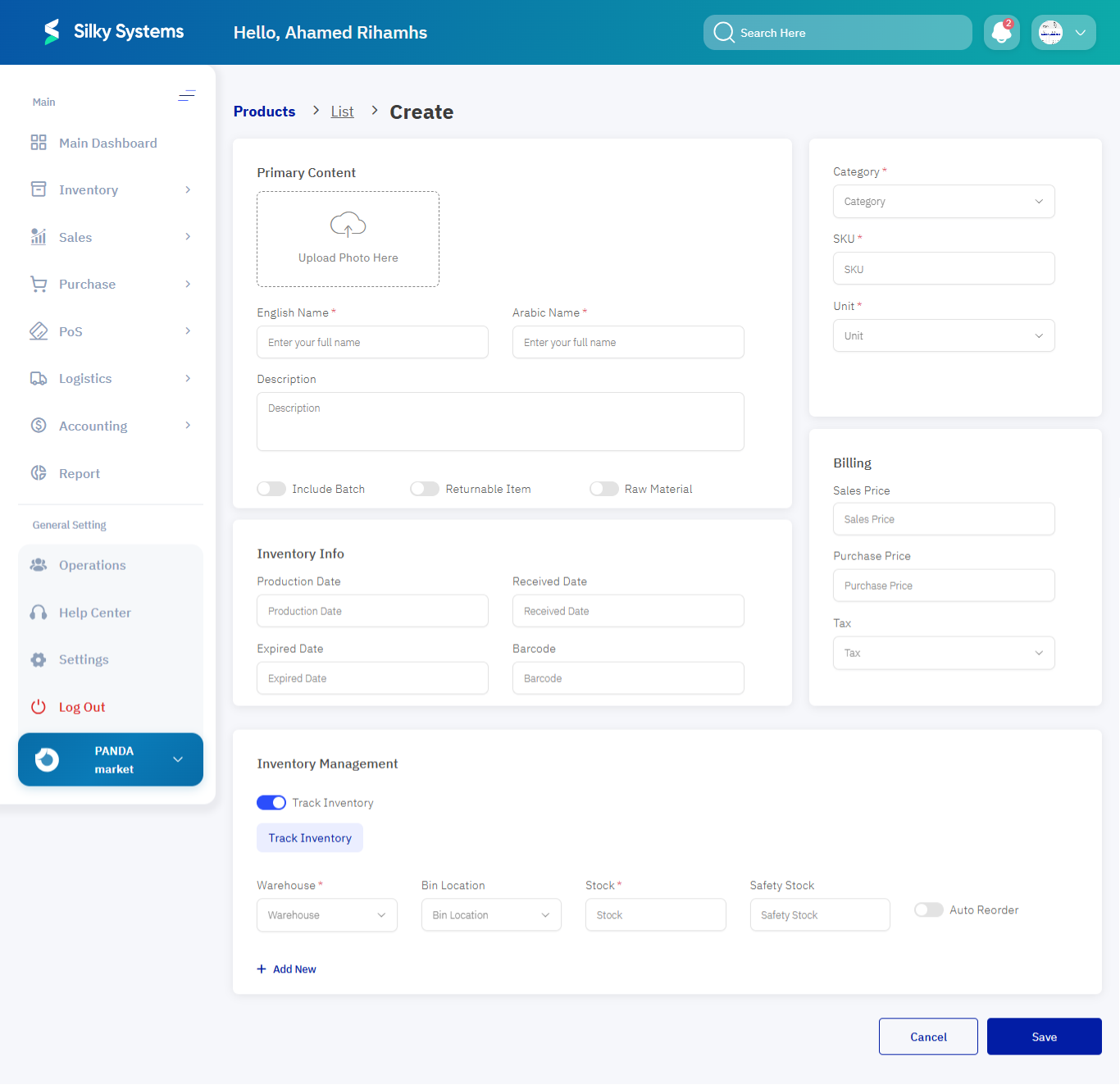
- Fill in the required details in the Create Product Form.
Product Information Fields:
- Name – Enter the product or service name. Example: Sunflower Oil 1L
- Type – Select whether the item is a tangible product or a service. Example: Product
- Category – Assign the product to a predefined category. Example: Oils & Fats
- SKU Number – Unique code for stock tracking. Example: SKU-1465721
- Unit – Define the unit of measurement (piece, liter, kilogram, box). Example: Liter
- QR Code Number – Unique QR code for quick scans. Example: QR-785498102
- Add Images – Upload product images for better recognition. Example: Front and angled view
3. Billing Information
- Sales Price – The retail selling price of the product. Example: SAR 12.00
- Purchase Price – The cost paid to suppliers. Example: SAR 9.00
- Tax – Applicable tax rate for the product (optional). Example: VAT 15%
4. Inventory Information
- Production Date – The date the product was manufactured. Example: 2025-05-01
- Received Date – The date the product was received into inventory. Example: 2025-05-05
- Expired Date – Expiry date if applicable. Example: 2025-05-01
- Barcode – Unique scannable product code. Example: 8906021128431
Stock Tracking Information:
- Warehouse – Where the stock is stored.
- Location – Shelf/bin location inside the warehouse.
- Stock Quantity – Current available stock.
- Safety Stock – Minimum quantity before alert.
Example: Warehouse: Jeddah Central Location: Shelf A3 Stock: 145 Safety Stock: 30
5. Auto Reorder Information
The system supports automatic reordering for inventory replenishment.
-
Source Type – Choose the replenishment source:
- Vendor (external supplier)
- Warehouse (internal transfer)
-
Reorder Quantity – Minimum quantity to trigger reordering. Example: 100 units
Example: Source Type: Internal Vendor Reorder Quantity: 100 units
6. Product Management Options
- Include Batch – Manage product in batches.
- Returnable Item – Mark if the item is returnable.
- Raw Material – Define if the product is a raw material for production.
- Edit Product – Update product details as required.
- Delete Product – Remove if not linked to transactions.
- Print Barcode – Generate barcode labels directly from the product actions.
Access Rules
- Only users with Admin or Inventory Manager roles can add, edit, or delete products.
- A product cannot be deleted if it is linked to active orders or inventory.
Benefits
- Centralized Management: Manage all product details from one place.
- Accuracy: Define pricing, stock, and categories clearly.
- Efficiency: Automate stock tracking and reordering.
- Control: Restrict access and modifications to authorized roles.
- Integration: Sync product details with Sales, Purchase, POS, and Logistics modules.